
Nebula footage 1
5.0/5 · 6 reviews







Panasonic
Panasonic S5II and S5IIX LUTs
Nebula Conversion LUTs · Panasonic LUTs | V-log
Original price was: € 50,00.€ 24,95Current price is: € 24,95.Save 50%
Take your S5II or S5IIX V-Log footage from a flat starting point to a deliberate, consistent look.
- Start with the Panasonic V-Log version
- Keep REAL TIME LUT and clean log recording distinct
- Use one clear conversion path through your edit
Description
The S5II and S5IIX both record V-Log with V-Gamut. That shared color foundation makes one useful starting point for choosing a LUT, even though the two cameras offer different recording features. Choose the Panasonic V-Log version of Nebula and check the input requirements of the supplied file. A codec or storage choice does not, by itself, tell you whether a clip needs a log conversion.
Product Info
Total LUTs
Creative LUTs: 10
Monitor LUTs: included
Total size
Download: 125,5 MB
Specs
Precision: 65-point .CUBE (high-quality)
Apps: DaVinci Resolve, Premiere Pro, Final Cut Pro, After Effects
Extra’s
PDF: Installation Guide
License Rights
Commercial Use Included
All our LUTs include a free commercial license with your purchase. You can use them in films, commercials, YouTube videos, social media, and more, without worrying about royalties or copyright issues.
Buy Once, Use Forever
Your license never expires. Once purchased, you can use the LUTs in unlimited projects. For full details, please refer to the Cine Source Digital Video Product License Agreement (PDF), which is included with your download.
One V-Log workflow for the S5II and S5IIX
The S5II and S5IIX both record V-Log with V-Gamut. That shared color foundation makes one useful starting point for choosing a LUT, even though the two cameras offer different recording features. Choose the Panasonic V-Log version of Nebula and check the input requirements of the supplied file. A codec or storage choice does not, by itself, tell you whether a clip needs a log conversion.
01Decide what REAL TIME LUT should do before recording
A look recorded in the camera and a clean V-Log clip are different starting points in post. If you want to develop the grade later, check your Photo Style and LUT settings before filming. Do not assume that a flat looking preview means the recorded image is untouched. Shoot a short test, bring it into your editing software and confirm exactly what was recorded before committing a full project.
02Avoid the second conversion
Strong contrast and oversaturated colors can come from converting the same image twice. Check whether your editing software is automatically interpreting V-Log, whether you added a technical transform and whether the selected LUT also performs conversion. Build one deliberate path from source footage to the intended output. Apply the instructions for the specific Nebula file rather than copying a node tree from a different LUT pack.
03Keep a consistent look across different deliveries
Start with neutral exposure and white balance, then judge the look on a few representative scenes. If you create landscape and vertical edits from the same material, establish the grade before refining each delivery. Check faces and bright surfaces again after reframing. For a project that also uses a GH7, use the Panasonic hub to compare the relevant workflow instead of choosing a LUT based only on the camera body.
Explore Panasonic workflows · Nebula product details · Installation guide


NEBULA CONVERSION LUTs
Transform your footage,
boost your impact.
It’s not your camera holding you back—most footage just needs the right color foundation. NEBULA gives your shots the balance and depth they deserve.


CRYSTAL CLEAR
Seamless Integration
Across Platforms.
Seamless Integration Across Platforms: LUTs Compatible Everywhere. Unlock the full potential of your footage.
Effortlessly with our seamlessly integrated LUTs, ensuring a smooth editing experience across all platforms.



CRYSTAL CLEAR
Image Quality
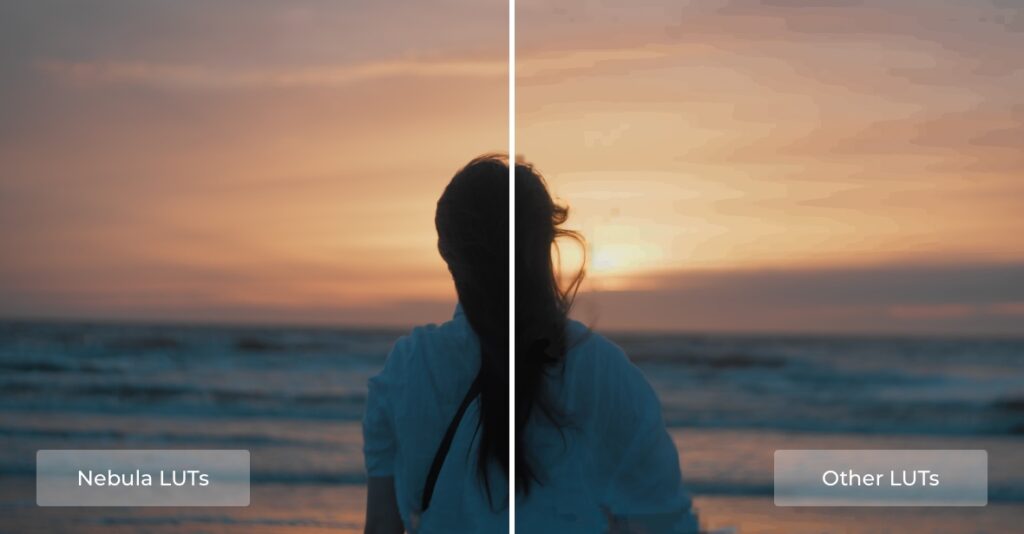
View the side-by-side comparison of banding and see the difference for yourself. Our LUTs guarantee artifact-free editing, ensuring your videos remain sharp and professional. No distracting artifacts, just perfect images.
EXCEPTIONAL
Color Quality
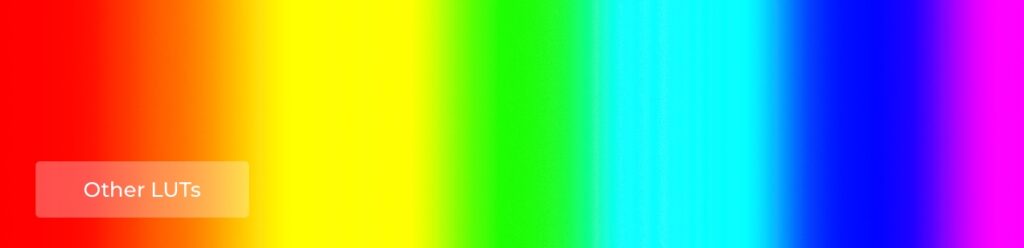
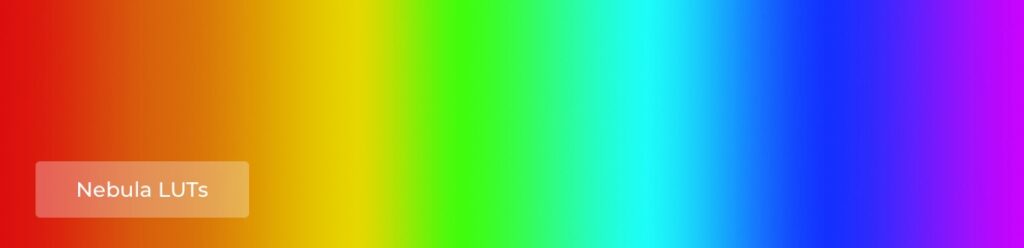
Our LUTs offer unmatched color gradation, as seen in the rainbow comparison. While other LUTs may show fading and inaccuracies, our LUTs maintain full spectrum integrity, ensuring vibrant and accurate colors you can always rely on.
Used by the World’s
Biggest Brands
From global campaigns to iconic commercials — leading brands trust our LUTs to craft unforgettable visuals.
Join the creators who set the standard, and elevate your projects with the same professional tools behind some of the world’s most recognized content.
Inclusive
Monitor LUTs
As an added bonus with this purchase, you’ll receive monitor versions of the LUTs. These are optimized in size to work in any camera or external monitor.
Nebula footage 2
Nebula footage 3
Nebula footage 4
Built for professionals.
Engineered for flawless results.
We work with real colorists to refine every node, curve and contrast shift, so your footage doesn’t just look graded. It looks cinematic.

1
Nebula Neutral
Nebula Neutral is the versatile emperor of the color world. This LUT keeps everything balanced without favoring cold or warm tones, making it a perfect choice for a wide range of projects.

2
Nebula Cold
Nebula Cold transports you to icy, serene landscapes. This LUT imparts a cool tone to your footage, creating a sense of calm and distance. Creates a feeling of clarity and purity.

3
Nebula Warm
Nebula Warm wraps you in a blanket of warmth and coziness. This LUT radiates with its golden glow, creating an inviting and warm atmosphere. Warm color tone with rich, golden hues.

4
Nebula Vision
Nebula Vision is the futuristic pioneer of the visual world. This LUT gives your footage a unique and progressive look, as if peering into the future. Blends cool and warm tones for a dynamic effect.

5
Nebula XTR
Nebula XTR is the intensive powerhouse that pushes your footage to the limit. This LUT gives a dramatic boost to colors and contrasts to create a bold and powerful look.

6
Nebula Eternal
Nebula Eternal brings timeless elegance to your footage. This LUT ensures a classic look that gives your footage a professional and cinematic character.

7
Nebula Split
Nebula Split offers the perfect balance between natural look and artistic enhancement. It is designed for those who seek to add a touch of elegance to their videos.

8
Nebula 5213
Nebula 5213 brings a vintage film look to modern footage, with classic film colors and an old-school feel.

9
Nebula 2383
Nebula 2383 offers a refined film look that gives your footage a professional and cinematic character.

10
Teal & Orange
Teal & Orange uses complementary colors to give your footage a dramatic, cinematic look. Ideal for action and adventure.
CUSTOMER REVIEWS
What filmmakers say.
The roll-off in highlights feels almost like Alexa footage. That surprised me.
Finally LUTs that respect dynamic range. My Blackmagic footage looks premium.
Zero weird color shifts. Just balanced contrast and depth. This is pro-level.
The highlight compression is insane. No harsh clipping anymore. Just smooth rolloff.
The Nebula LUTs instantly gave my footage that moody cinematic depth. Skin tones stay clean, highlights roll off beautifully.
I purchased these LUTs for my Sony FX3 and my Blackmagic Pocket 6k Pro and I am super happy with the results! It’s really easy to match the images and the creative LUTs give you a super quick and filmic look as a base. Definitely recommend them to others.
Frequently asked questions
Do the S5II and S5IIX need separate LUT purchases?
The relevant Nebula product option is Panasonic V-Log. The recording profile and the file input requirements determine the choice, rather than the S5II or S5IIX name alone.
Can I apply the V-Log conversion after recording with REAL TIME LUT?
First check whether the recorded image already has a look or conversion applied. Do not automatically treat that file as untouched V-Log.
Is a V-Log LUT also correct for every Panasonic Photo Style?
No. Standard, Cinelike and other Photo Styles should not automatically receive a conversion intended for V-Log.